
Account & Facility Updates
Updating User Account Information:
To update your PA AEPS account username and/or password, please log in to your account. In the top right corner, hover over “Welcome (your name)” and select “Account” from the drop down options.
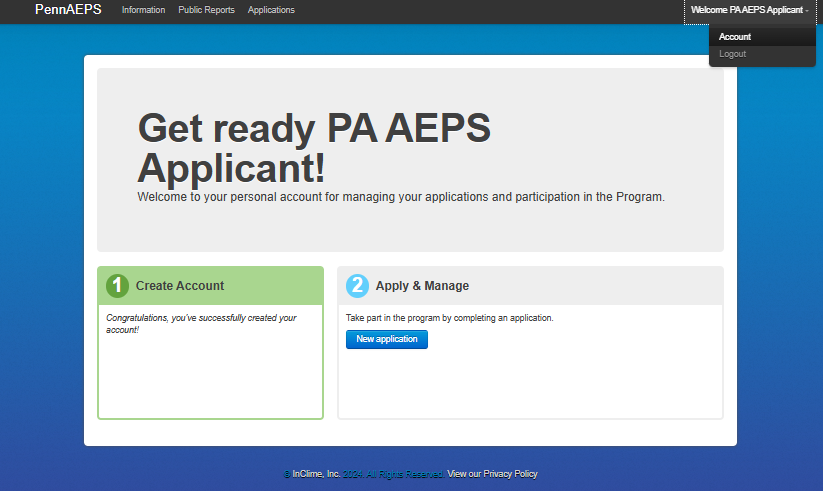
From here, you may change account information such as the account email address, password, username, and account address. Please be aware that only one email address or login may be associated with each account. Please be sure to select “Save Changes” on the right-hand side of the screen to ensure your account information updates are saved correctly.
Updates to system information:
If changes were made to the the interconnection date, the online date, the facility location, or array details resulting in a change in DC kW size (not to the inverter details / AC kW size) for a system that is registered in PJM GATS, a GATS system change form must be completed. You may send the completed and signed form to PJM GATS to notify them of this change. Please also email [email protected] to notify the program administrator of the requested change(s) and we will update your application accordingly.
If the inverter equipment and/or meter equipment has been replaced, the old system may be decertified and a new application may need to be submitted with the updated equipment details. Please email the program administrator at [email protected] with the details of the update.
If you have expanded your registered system or another system was installed at an existing facility address, a new application will need to be submitted as an “aspect of an existing facility.” The expansion application needs to be submitted from the same account as the existing system if the system owner information remains the same.
If the new system is metered with the original system, please provide information for only the additional equipment installed. This includes the additional array(s) details such as the number of modules, orientation, and module power rating as well as additional (not preexisting) inverter(s) installed. You will also need to provide the existing PA Certification Number and a new Certificate of Completion/Permission to Operate issued by the utility if there are changes to the AC size.
If the new system is separately metered, please provide proof that production is recorded and monitored separately (a screenshot of the monitoring portal or photo(s) of the solar dedicated meters will suffice). Separately metered applications will require all new supporting documentation. Please include “(second system)” or “(addition)” in the installation street line to avoid a duplicate address error.
Updating System Ownership:
If you have sold or bought a home with solar panels installed, and the system has been registered with the PA AEPS program, you will need to complete a GATS Ownership Transfer Request form and create an account with PJM GATS. Please ensure that all required signatures are present on the transfer form. If the ownership change is due to a death, the estate executor should complete the GATS Ownership Transfer Request form as the seller and include a death certificate. Please contact the program administrator if you are unsure whether the installed system has been registered with the PA AEPS program.
If you are unable to obtain the seller’s signature, please provide the deed showing the transfer history of the property.
Once you have compiled all required documentation, please email the completed form(s) as well as the preferred new project name, new owner name, new owner email address, and new owner phone number to [email protected].
For more information on ownership transfer information, please review the GATS Transfer Ownership Information Sheet.
If your system has changed ownership prior to receiving state certification and the Certificate of Completion/Permission to Operate document is in the name of the old owner, please include a note in the application (under “Applicant Comments” in Step 5) explaining the name discrepancy between the CoC/PTO and the application. No additional documentation is required.
Aggregator Transfer Request:
If you have selected an aggregator to manage your system on your behalf after receiving state certification, please provide a signed and dated Schedule A to [email protected] after receiving confirmation from PJM GATS that the transfer has been approved within their system. For information on those steps, please view the GATS System Transfer Process Overview.
If you are opting out of an aggregate’s management, please contact PJM GATS with a completed and signed Schedule A document. PJM GATS will reach out to the current aggregator managing the system to see if the system may be changed to “self-managed.” Once you receive confirmation that the system has been transferred to the new account holder in PJM GATS, please notify the program administrator at [email protected].
